That’s my first article - I want it to be short and fun.
I was always excited to read about legendary DOOM game being run in Excel or on the pregnancy test. Since I am not a hardware expert, I decided to connect DOOM to something I am aware of (and actually even contributed a small feature to) - Aspire.
Aspire is amazing: it has many definitions for different use-cases, but for our “doomification” it’s a tool to manage all of the dependencies in the inner-loop. Let’s consider this example:
var builder = DoomedApplication.CreateBuilder(args);

var redis = builder.AddRedis("redis");
var storage = builder.AddAzureStorage("storage");
var postgres = builder.AddPostgres("postgres");

var api = builder.AddProject<Projects.AspireDoomify_Api>("api")
    .WithReference(redis)
    .WithReference(blobs)
    .WithReference(database);
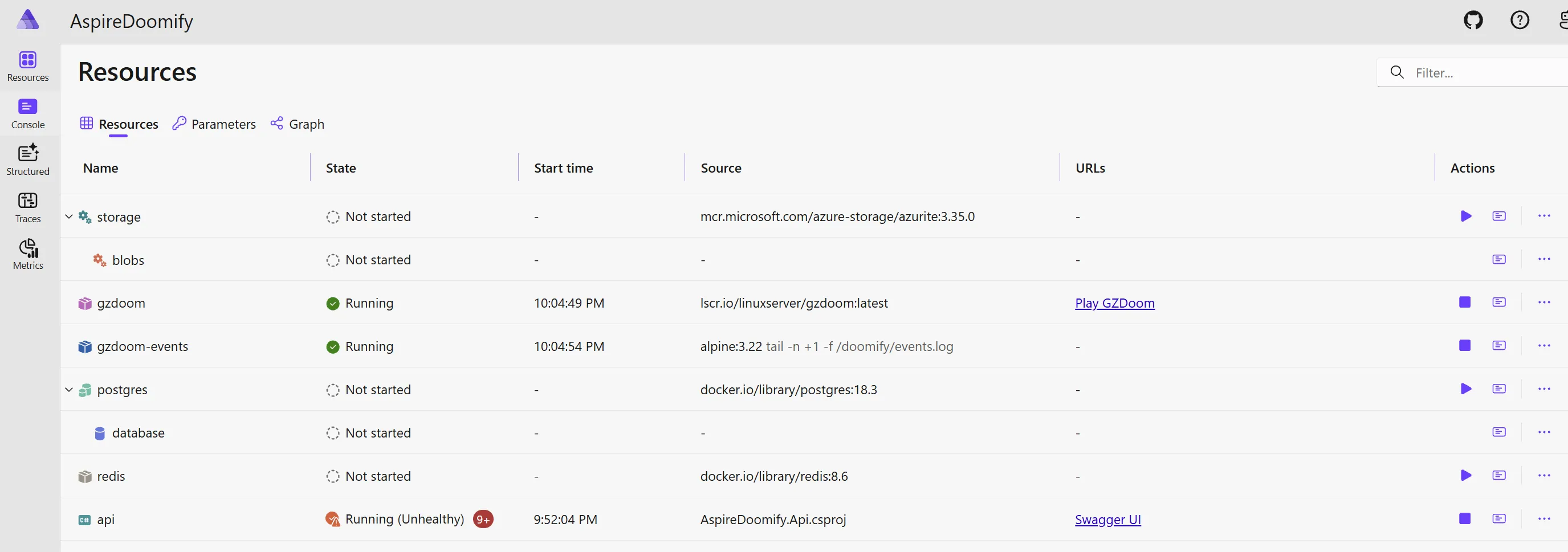
This aspire host is trivial: we have a web-api, which has a dependency on redis, azure storage and postgres. Normally you would start your application and dependencies via aspire run, and see them green on the dashboard - but they are not running, except a mysterious gzdoom. You can see the reason probably - we use DoomedApplication instead of standard DistributedApplication!
What I really like about aspire is extensibility in any part of the stack. It’s up to you - just building a specific app and defining/managing dependencies or starting “from scratch” by using your own IDistributedApplicationBuilder. DoomedApplicationBuilder is as simple as overriding Build behavior to:
- call
.WithExplicitStart()on the resources (that’s why they are not running by default) - setup the assets/scripts/mods for GZDoom
- add the
DoomEventBridgeservice which is the connector between game and aspire.
Let’s see it in action - on the video you can see DOOM game starting, and once you get to the monster-spawn point resources startup. Then you can see player encountering “Storage” imp and “Redis” imp, which when killed stop the app. In the top-left corner subscribed DOOM_EVENTS are being logged.
GZDoom has a wide API where you can subscribe to the game events. The most interesting part is logger, which listens to spawns and deaths, and if finds specific type simply prints the event to console:
class ResourceEventLogger : EventHandler
{
    override void WorldThingSpawned(WorldEvent e)
    {
        String resourceType = GetResourceType(e.Thing);
        Console.Printf("DOOM_EVENTS:%s:start\n", resourceType);
    }

    override void WorldThingDied(WorldEvent e)
    {
        String resourceType = GetResourceType(e.Thing);
        Console.Printf("DOOM_EVENTS:%s:stop\n", resourceType);
    }

    private String GetResourceType(Actor thing)
    {
        Name className = thing.GetClassName();
        if (className == 'RedisMonster') return "redis";
        if (className == 'StorageMonster') return "storage";
        if (className == 'PostgresMonster') return "postgres";
    }
}
Replacing imps to have a custom icon and behavior (and name) is a matter of creating a new type. RedisMonster example:
class RedisMonster : DoomImp replaces DoomImp
{
    ...
}
The only missing part here is to connect aspire resource management with events in the game - and that’s DoomEventBridge’s job. It has a loop reading the shared log file GZDoom emits the events to, and reads it line by line. When it detects the event we are aware of, it uses Aspire.Hosting.ApplicationModel.ResourceCommandService which has the API to execute custom command (see ExecuteCommandAsync()) to start or stop the resource:
private async Task<long> ReadNewEventsAsync(long position, CancellationToken cancellationToken)
{
    ...
    while (await reader.ReadLineAsync(cancellationToken) is { } line)
    {
        if (!TryParseEvent(line, out var resourceName, out var action))
        {
            continue;
        }

        if (action == StartAction)
        {
            var result = await resourceCommands.ExecuteCommandAsync(resource, KnownResourceCommands.StartCommand, cancellationToken);
            ...
        }
        else
        {
            var result = await resourceCommands.ExecuteCommandAsync(resource, KnownResourceCommands.StopCommand, cancellationToken);
            ...
        }
    }
}
A technology should not be relied upon until it runs Doom, and we just proved Aspire can run Doom!